
The main text of each page is controlled by a wysiwyg editor. Wysiwyg stands for "What You See Is What You Get" and it consists of a bunch of little icons and an open form field where you type the info.
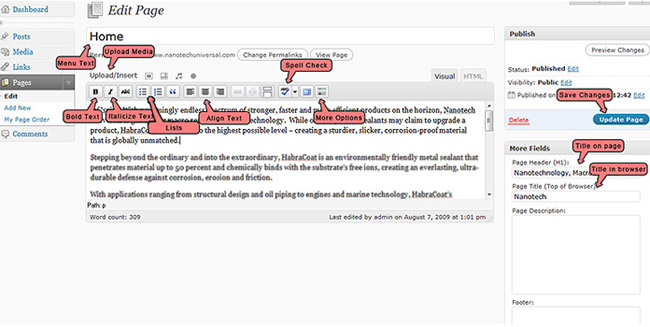
In some cases, your CMS will be black or a different color. That does not affect its functioning in any way.
If you work from the "visual" tab, you do not have to know HTML to edit text. You can simply make the changes and update the page. You also have the option of working from the HTML tab, although chances are this won't be ideal for you if you do not have web experience.
Note: If the page you are editing has had custom HTML added you will need to make your changes through the HTML tab. Otherwise Wordpress might remove some of the custom code as a security precaution.
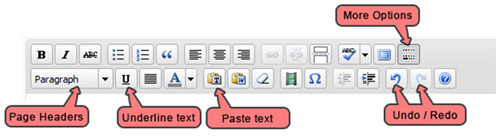
Common buttons that you may use include the bold, italics, and page headers buttons.
It is strongly recommended that you do not attempt to set up fonts or adjust text colors or sizes. If you do need to create a paragraph header that stands out, select the text, then click the "page headers" drop down menu, and then choose "Header 2." The Header 2 button will have been customized for you in advance.
How to Write Text (Or Edit Text)
Put your mouse in the main box and start typing. To save your work, make sure you click the publish button.
Notes
- You can save it as a draft if it's a new page and it's not ready.
- You can modify the release date so if you have specials, you can preset the launch of the page months in advance.
How to Bold or Italicize Text
1. Select the text you wish to bold/italicize.
2. Click 'B' or 'I' (buttons located above main text input)